Skip to content

Devi Sri Mari Blog:: Web Technology Trends, News, and Social Media

Menu
  • About Me
  • CONTACT US
  • Sample Page
  • WEB DEVELOPMENT
Menu

How to Modify Title Tag in WordPress

Posted on February 3, 2014

To modify the title tag of your website index page you need to login to the WordPress admin panel.

Go to Settings -> General. On this page, edit the Site Title field and click the Save button.
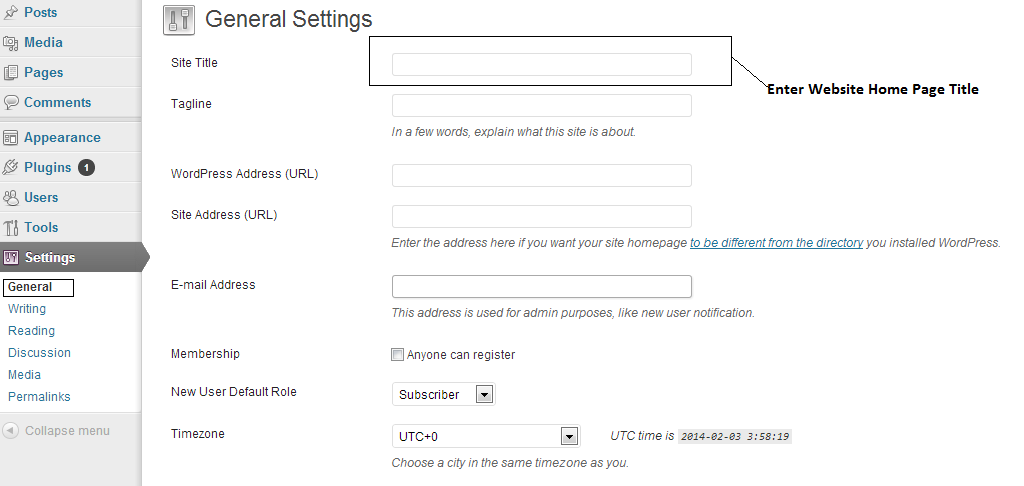
wp-settings

By default there is no option in WordPress to set custom title for each post or page you create. By using the plugins like All in One SEO Pack, you can add this functionality for your website.

Leave a Reply Cancel reply

Your email address will not be published. Required fields are marked *

Recent Posts

  • “Who needs Superheros when there is a Real hero and she is called as Mother”
  • Improve Your Business Behind Social Media
  • Single-Page Application Benefits and How it Works
  • World Sparrow Day
  • Google’s ‘Mobilegeddon’ Will Affect Search Results
  • How To Use Google’s New Blocked Resources Report
  • Wikipedia Lists Ten Most Edited Pages Of 2014
  • Google Is Shutting Down The Google Earth API
  • Google Maps App Adds Real-Time Weather & Facts
  • Google Maps App Gets Design Revamp
©2026 Devi Sri Mari Blog:: Web Technology Trends, News, and Social Media | Design: Newspaperly WordPress Theme