To build a WordPress website by using the server URL
http://servername.com/~username/
servername.com is the actual server name where your account is located. You can get domain information from the name servers provided for your domain name or from your cPanel > Account information section (located on the left side of the home page) > Server hostname.
username is the cPanel username for your account.
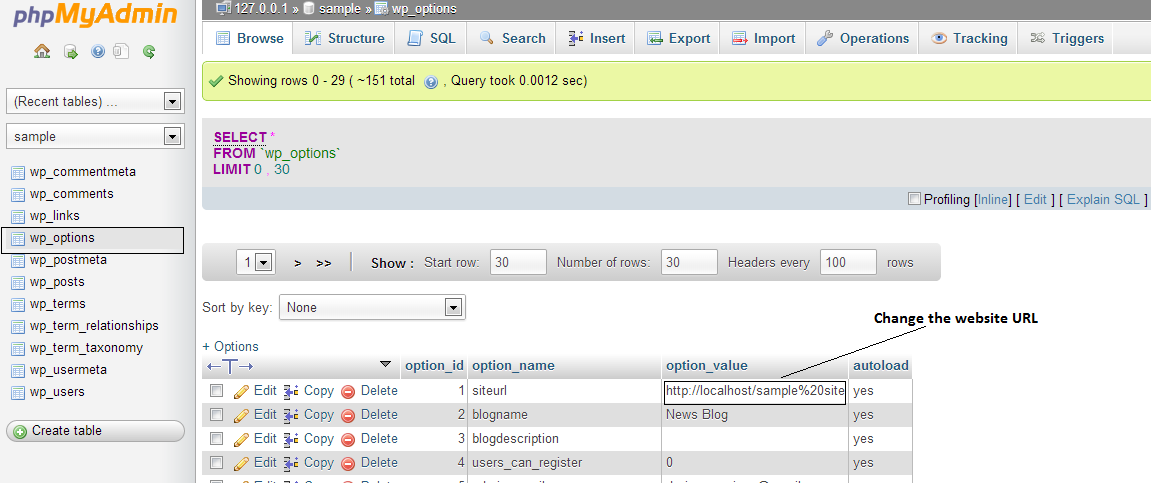
To do a WordPress installation via cPanel > Softaculous. After the completion you can also change the siteurl and home options in your WordPress database. To do this by using the phpMyAdmin tool available in your cPanel.
In phpMyAdmin select the wordpress database and then choose the wp_options table. Find the options siteurl and home and change their values to the server name URL for your account.
Change the wp-config.php file situated inside the WordPress root/installation folder. You can open the file through cPanel > File manager and search for the following line:
define(‘DB_NAME’, ‘database_name’);
where database_name is the name of your WordPress database.